
If you’re familiar with this blog, you’ll know why it’s about time to make (big) AI less impactful (if you’re not yet, you can read more about that here; and to learn more about how to evaluate those impacts, it’s here).
So now it’s time to get positive, and talk about Solutions. No, Fixes. Or rather, Mitigations. Let’s not fall into the big AI trap of believing in magic wands and miraculous remedies. Often, all we can do is limit the impacts once they’re happening; or ideally, stop them beforehand.
The below tips are a mixture of both, and a bit more besides. Whatever they are, they are tried and (scientifically) tested. And naturally, environmentally frugal almost always rhymes with financially frugal, as doing things more modestly almost always costs less. So take note!
1. Do I need AI?
The pressure of the big AI hype train can be so huge – especially when amplified by C-levels – that the urge to slap an LLM (large language model) onto project X, Y or Z is often hard to resist. But resist, you must! Because more often than not, it’s not necessary. Or not everywhere, at least. Two of my favourite examples on this front:
- A small transport company was looking for ways to speed up its order dispatching, and was keen to use AI to do so. With the help of specialist startup Terra Cognita, it did exactly that. But when it came to managing internal and external data requests, it wanted an LLM for that too. Terra Cognita instead suggested a dashboard, which does the same job, without AI, and saving an estimated 150kg in CO2eq emissions per month. Not bad, eh?
- Miralia, another French startup, uses a mixture of symbolic (good old fashioned) and generative AI to help companies to sort incoming emails, invoices and such, sending them automatically to the right department. This 90/10% mix means that only the right (small) dose of generative AI is used to do the things symbolic can’t (e.g. complete texts). Results? 100x less emissions (than a fully LLM-based solution); considerably higher accuracy (LLMs’ accuracy for this task is around 75%); and 5x lower cloud bills. Result!
2. Smallest model for my needs
Once you’ve got a clear idea of what you actually want to do – and that generative AI is the only way to do it – apply a straightforward principle: find the model that fits the bill, with the smallest possible number of parameters. Why? Because you can be reasonably sure that the smaller a model is, the lower its resource needs, and therefore impacts, are.
These days, however, fighting the prevailing “bigger is better” movement is more easily said than done. ChatGPT, still by far the most-used LLM in the world, has an estimated 2 trillion (2T) parameters. Whereas most peoples’ needs – researching information, editing texts for emails etc – can be covered by a small model, with around 10 billion (10B) parameters.
TL;DR: most people (800m per week) are using a model that is c. 2000 times bigger than what they actually need.
The must-read white paper Hype, Sustainability, and the Price of the Bigger-is-Better Paradigm in AI (Luccioni et al) remains a reference in its demonstration that models at least 60 times smaller than the biggest LLMs can be just as performant. Hell, even NVIDIA (Research) agrees that Small Language Models are the future of Agentic AI, in particular because it makes sense that smaller components work better together than the monster trucks that are ChatGPT, Gemini or Claude.
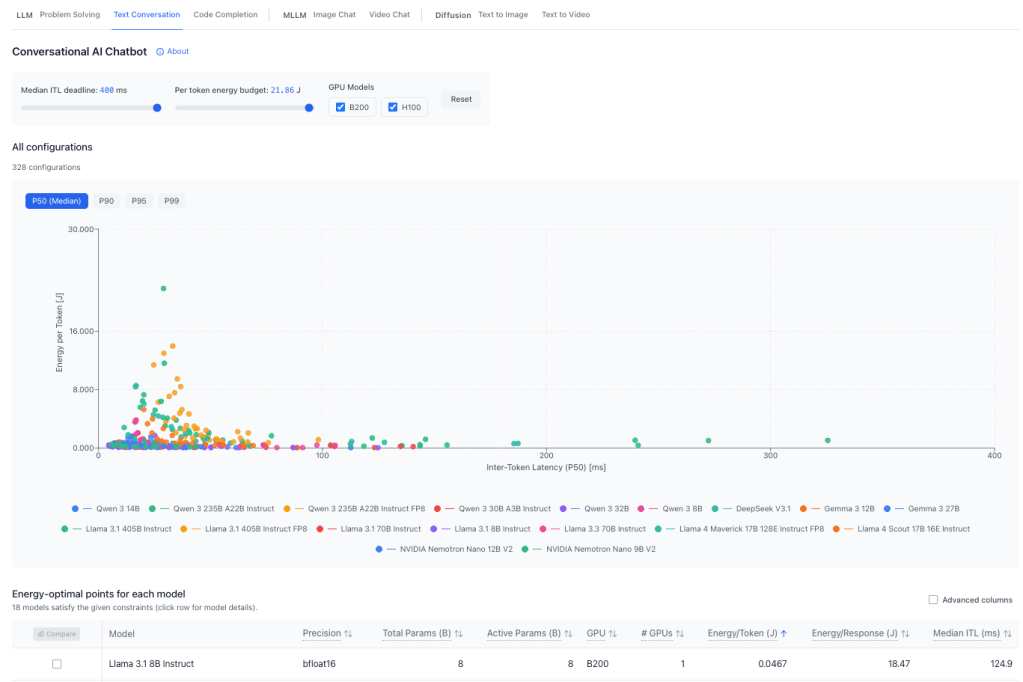
To find the right tools for your needs, you can start with the excellent ML.Energy Leaderboard (above), which displays, task type by task type – LLM, MLLM or Diffusion – the best models in terms of energy consumed per token (Y axis) and inference speed (X axis, aka, inter-token latency, a common KPI to measure model performance by). You’re almost ready to go!
3. Is EU hosting possible?
This point is a question, because the answer is often no. If you ask ChatGPT, Copilot or Claude anything today, that prompt most likely goes off to a data centre (DC) in the US. Possibly Virginia, where most of the world’s DCs are. Unfortunately, electricity over there has ten times more carbon in it than in France, for example, as the excellent ElectricityMaps demonstrates. Which naturally means 10 times more emissions.
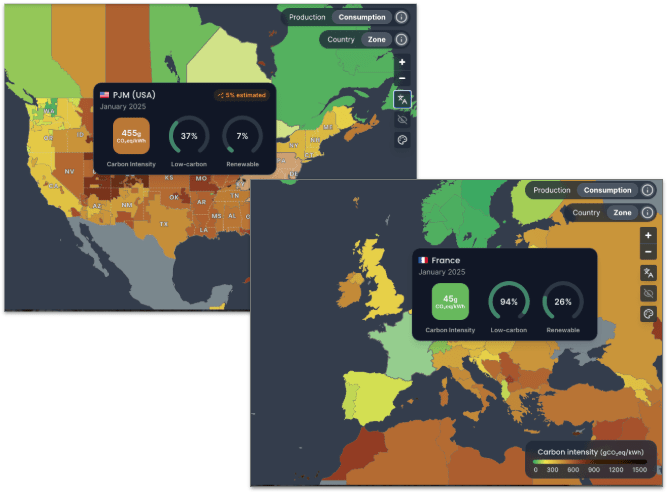
Just as naturally, moving your workloads to a low-carbon-intensity country like France or Sweden will as such make them 10x less emissive. This doesn’t necessarily mean changing cloud providers, as even some of the biggest let you choose your data centre (ex. Google, here). However, moving to a local cloud provider could bring extra benefits.
Choosing to host an open source model (more on those below) with a company like Scaleway not only means lower emissions; it’s also most likely significantly cheaper than a hyperscaler (the three biggest cloud providers). Hosting a small (7-8B) model with Scaleway costs from €680/month, whereas doing the same thing with a big US provider can set you back well over €1000. Of course, the smaller the model, the less hosting capacity you need; so if you can do that on your own hardware, the cost will logically be zero!
Last but not least, EU or local hosting has the added bonus of being 100% sovereign. I.e. extraterritorial laws like the US’ Cloud Act cannot apply to your data if it is 100% Europe-hosted by a 100% European company, or on your own servers. Local or EU hosting open source models also guarantees your prompts won’t be used to train other models (big AI models, even some of the paid ones, reuse your prompts for training by default).
4. Is Open source possible?
Most big AI solutions (ChatGPT, Copilot, Claude, Gemini and Grok) are closed/proprietary, which means we can’t look under the hood to see how they are made. This makes tracking their impacts close-to impossible. Open source models, however, are at least partially transparent:
- Open Weights: free, downloadable, but training details limited. E.g. Mistral Small 3.2, Llama 4 Scout, Gemma 3 12B
- Open Source: model weights known, free reuse and distribution of the model. E.g. Apertus 70B Instruct, Olmo 3 32B Think
You can even check how transparent they are with the excellent website osai-index.eu (thanks to Compar:IA’s Simon Zilinskas-Inta for these great tips: more here)
Other considerable advantages of open source models:
- Host them where you like (public cloud, private cloud, on-premise, or even on your PC or smartphone if the model is small enough)
- This also means you’re not locked into one specific type of model/system (e.g. NVIDIA’s AI software only works with NVIDIA AI hardware…)
- Adapt them to your needs, with techniques such as:
5. Is Evaluation possible?
This point will be short, as we already covered it last time hehe! But it remains essential. If you choose to go with a big AI model, you’ll have a much harder time monitoring its environmental impacts. Copilot, for example, is notoriously opaque on this front. With open source, on the other hand, it’ll be way less difficult.
If you do want to have a go at evaluating and comparing the two types, look no further than EcoLogits (full disclosure: I’m a member of the NGO that makes it) or, for a different but equally interesting angle, Compar:IA (which also leans on EcoLogits). N.B.: as of early 2026, EcoLogits is part of CodeCarbon, which also measures AI impacts, albeit differently (cf. below).
PS: note the insistance on the word “evaluation”. As long as big AI is not more transparent with their data (energy consumption, electricity mix, water etc etc) these will only be highly-educated guesses. EcoLogits, for example, works out the impacts of big closed models by comparing them with those of similarly-sized open source ones. Meaning it’s precise enough to know, for example, if your company’s IT systems are about to hit their emissions limits because of AI…
PPS: This opacity didn’t stop one developer working out his Claude Code emissions for the year will be 1 tonne of CO2eq. Or one tenth of what an average French person emits in a year. Keep up the great work, big AI! 🙄
6. Green prompting
This is one of my faves, as it applies even when you have no choice but to use a big AI model (e.g. because of your company policy). Green prompting is based on the simple principle that the less you get an LLM to produce in terms of output, the lower the impacts, because it will use less tokens (and each token generated uses electricity, water etc). So, for example:
- Ask for everything you want in one prompt – vs. several – for example by using the COSTAR method
- Avoid using over-technical or local jargon or acronyms
- Ask specific questions, so the model doesn’t interrogate its entire knowledge base
- Similarly, don’t ask the model to search the internet: this can generate 300x more emissions per prompt (and you should know how to search the internet yourself!)
- New subject? New conversation. Otherwise the entire old conversation will be re-processed with the new one.
(Sources: Groupe SNCF, GreenPT, Compar:IA, Asim Hussain, Lancaster University)
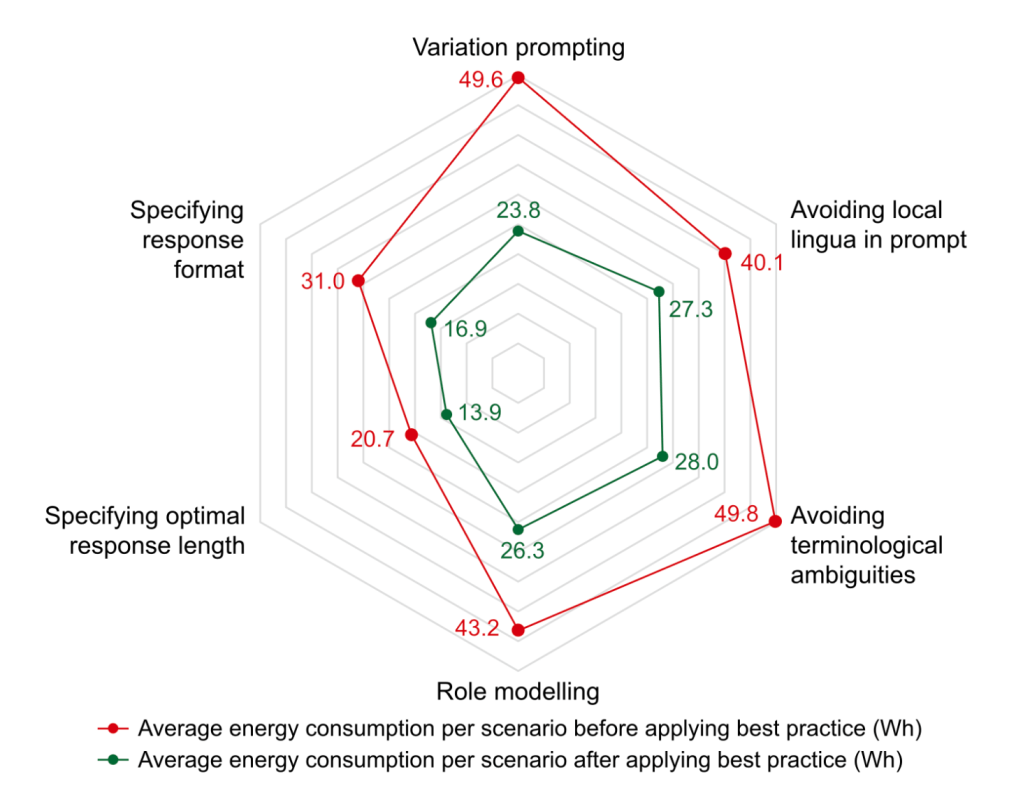
Why bother with all of the above? According to a recent white paper (above), following tips like the above and more can lead to inference energy and emissions reductions of 32-48%. And logically, as less tokens mean less emissions and less cost, your compute bill should come out lower, too.
An important proviso here, however: this paper used EcoLogits to come up with the above figures, due once again to big AI’s lack of transparency. The figures are as such estimations, but the best we can get right now (and indeed useful for keeping a lid on emissions until we get better stats, one fine day!)
7. Monitor, rinse, repeat!
Once your fabulous new frugal AI system is up and running, can you just let it be and move on? Of course not! Having previously tested it with representative prompt samples to work out the energy impacts of each prompt, and benchmarking it against similar systems (that you might find in ML.Energy Leaderboard, for example), keep those evaluation tools plugged in so you can keep monitoring environmental performance factors over time. “Which tools?”, I hear you say!
- EcoLogits Library is the Python version of this versatile tool (the public-facing version is the Calculator), which plugs into your app/site’s code so you can do things like display to users the quantity of emissions (and water and energy and more) generated or consumed by each prompt (how to here). As with the calculator, this works with API-called/cloud-based models
- Code Carbon is ideal for self-hosted models, i.e. that you’re running on your own hardware (how to here), and only displays CO2eq emissions.
Such monitoring will, of course, be useful for keeping an eye on costs as well as emissions, and on how usage of your AI tools. Think about end of life, for example: if noone is using one of your AI services anymore, it’s time to switch it off, and/or replace it by another one.
Et voilà!
This is, of course, the simplest possible version of how to reduce AI’s impacts. Get the full lowdown in my “Frugal AI” training course, with GreenIT.fr (more info in English; plus d’infos, dont dates, en français); see you there soon! 👋🏻
PS: special thanks to Minh Anh Vo Schuft for her BetterTech rebrand: looks good, eh? 🤩

 BetterTech